Reference
Backlog health checks
Every check Backlog health runs on your links, what each finding means, and what you can do from the list.
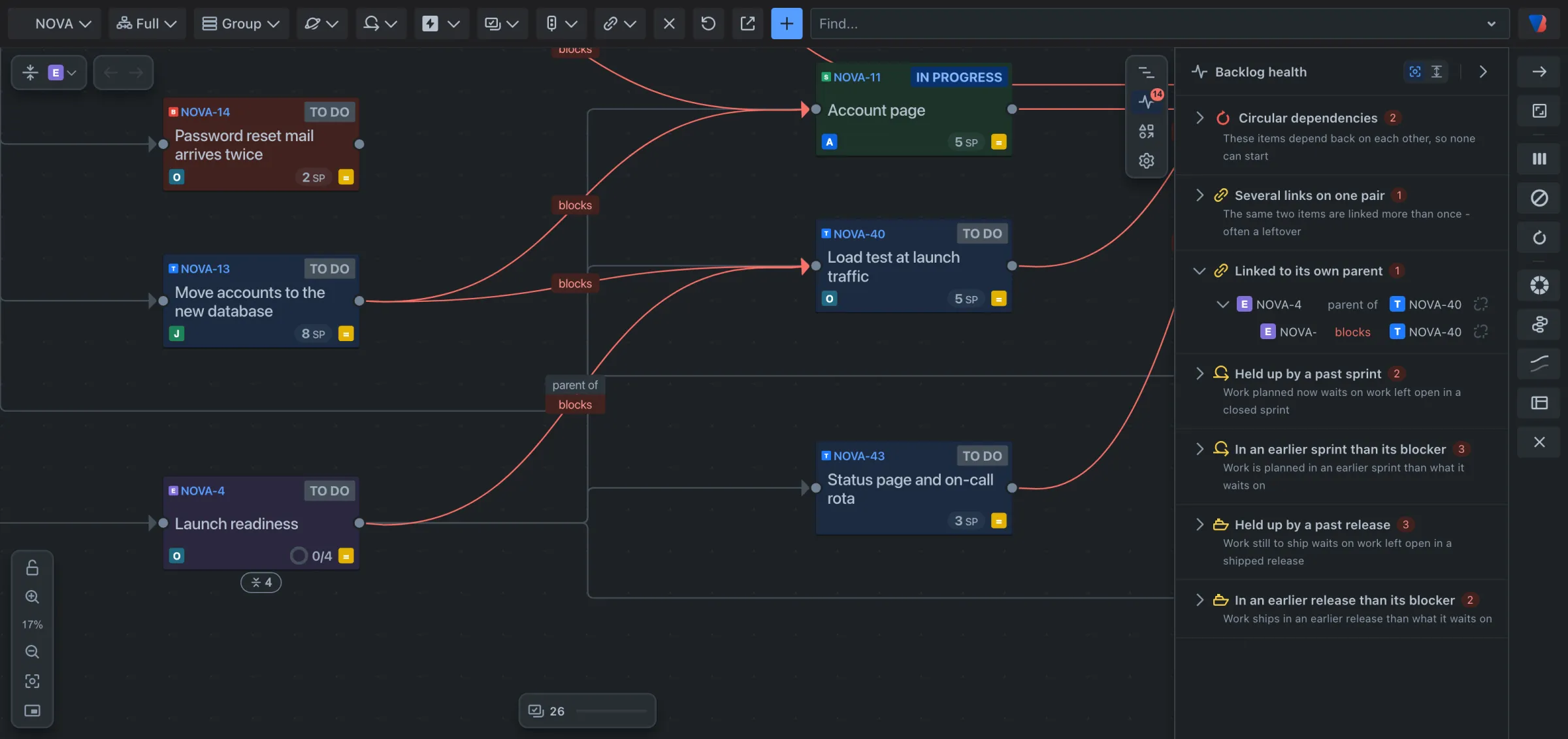
Backlog health checks the links of everything the map loaded, including folded work. Open it with the second icon at the right of the map. The number on the icon is the total of all findings.
A dependency here means Jira’s Blocks link, or the link types your space counts as dependencies.
Checks on links
| Check | What it finds | What to do |
|---|---|---|
| Circular dependencies | Work items that depend back on each other, so none can start. | Open the row to see each link in the circle, and remove the one that should not be there. See Find and fix a circular dependency. |
| Several links on one pair | The same two work items linked more than once. Often a leftover. | Open the row, then remove one link or all of them. |
| Linked to its own parent | A link between a work item and its own parent, for example a story that blocks its epic. It repeats or contradicts the parent line. | Open the row and remove the link, unless your team links them on purpose. |
Checks on sprints and releases
| Check | What it finds |
|---|---|
| Held up by a past sprint | Work planned now waits on work left open in a closed sprint. |
| In an earlier sprint than its blocker | Work is planned in an earlier sprint than what it waits on. |
| Held up by a past release | Work still to ship waits on work left open in a shipped release. |
| In an earlier release than its blocker | Work ships in an earlier release than what it waits on. |
These compare the sprints and releases already set in Jira. They do not estimate dates.
In the list
- Point at a row: the work items involved light up on the map.
- Click a row: it opens, and the map moves to those work items.
- Remove a link: the icon at the right of a link’s row. You are asked to confirm; Keep this link cancels.
When something is hidden
- A problem inside a folded card turns that card red. Its row says which card it is folded inside; click the row to open it.
- A problem whose link type is hidden by the link type filter says so, with Show to draw it again.
- In Parent mode no links are drawn; Backlog health offers Switch to Full, to see the parent lines.
When nothing is found
A section with nothing in it says so, for example Nothing depends back on itself.